[MediaMod] Android M Rom for MTK6572

MediaMod Android M (Marshmallow) Rom for MTK6572


Rom Description:

Rom Name: MediaMod
Based on Amzen Rom
Version: 1.0
Chipset: MT6572
Android Version: 4.2.2
Rom Developer: Wahyu hidayat (Orange Team)
Official Orange Team

MediaMod MT6572 Features:

Lollipop UI with Android M (Marshmallow)
Orange color UI
Resent Lollipop
Lollipop Phone Dialer
Smooth Performance
Included Swap cache
Lollipop Notification
Google Lollipop Keyboard
Xperia Modded Launcher
Modded Package Installer
Tinted Status Bar
Tinted Nav Bar
Android M Logo
Dolby Digital Plus

M features in Settings
List View Animation
Lock Screen
Fonts Chooser
Torch


Screenshot:


Download Media Mod Orange UI Rom


Credit
Full Credit list in Settings Credit.ini


Process:

Reboot to Recovery Mode >

A.Wipe data/factory reset
B.Wipe cache partition
C. Mount and storage >

               1. Format data
               2. Format system
               3. Format cache

D. Advanced >

               1. Wipe dalvik cache

Back to the Main Menu.
Select
Install zip from sdcard > Choose zip from sdcard
Select Rom zip file.

Installation will start. Wait until finish.
Reboot and Enjoy the Rom

Porting Guide:
How to Port Rom for MT6572


N.B. : Do all things at your won Risk. I will not be responsible for any kind of Brick/Damage of your Device/Phone.


[HTC Rom] HTC Lollipop Custom Rom for MT6572

Custom Rom for MT6572 4.2.2
HTC Rom for MTK6572

Rom: HTC One
UI Lollipop
Android Version: 4.2.2
Device: MTK6572


Rom Features:

HTC Dialer
HTC Contacts
HTC Message
HTC File Manager
HTC Clock
HTC Quick Settings Beta
HTC Calculator
Keyboard HTC
Fancy Sense
Framework Lollipop
Rooted

Google Play Store

Bug: Brightness in settings not working .
        Wallpaper chooser not working but can set wallpaper from Gallery.
If you find any other bug please write on comments. I will try to fix it.


Screenshot:

More Screenshot


Do Not Publish this anywhere without permission and without giving proper credit.


For Download This Rom Send Message or Write on Comment

If you port this rom for your device please send me the device name after ported.

Ported Device:
Symphony W85
Alcatel pop c3
Evertek Everfancy D40


Credit:
MTKcROM

Do not share this rom without giving proper credit to MTKcROM


Installation Process:

Reboot to Recovery Mode >

A.Wipe data/factory reset
B.Wipe cache partition
C. Mount and storage >
               1. Format data
               2. Format system
               3. Format cache
D. Advanced >
               1. Wipe dalvik cache

Back to the Main Menu.

Select
Install zip from sdcard > Choose zip from sdcard
Select Rom zip file.

Installation will start. Wait until finish.
Reboot and Enjoy the Rom


HTC Lollipop Custom Rom for Symphony W85
Others MT6572 Devices such as 
Lenovo A369i
Xolo A500s 
Huawei Y511
ZTE V818
Symphony W82
Symphony W72
Symphony W68
Walton Primo E2
Walton Primo F4
Karbonn Mobile
Doogee &
Micromax Mobile -Need to port this rom.


Rom Porting Guide for MTK Devices


N.B. : Do all things at your won Risk. I will not be responsible for any kind of Brick/Damage of your Device/Phone.

[OREL] Custom Rom for MT6572 [4.2.2]

Custom Rom for MT6572

With the nice performance and fully stable stock based rom for Mediatek MT6572 devices.  


OREL ROM
Device: MT6572
Android: 4.2.2

Rom Features:

Officeal Stock based
Full Odex Rom
Black UI
Video Calling
3G Switching Option
Theme Switching Option
Colored Settings Icons
Smooth and Nice Performance
Bug less and Stable Rom


Screenshot:


Download OREL Rom for MT6572
If you port this rom for your device please send me the device name after ported.

Credit:
MTKcROM


Do not share this rom without giving proper credit to MTKcROM


Flash Process:
Reboot to Recovery Mode >

A.Wipe data/factory reset
B.Wipe cache partition
C. Mount and storage >
               1. Format data
               2. Format system
               3. Format cache
D. Advanced >
               1. Wipe dalvik cache

Back to the Main Menu.

Select
Install zip from sdcard > Choose zip from sdcard
Select Rom zip file.

Installation will start. Wait until finish.
Reboot and Enjoy the Rom


Custom Rom for Symphony W85
Others MT6572 Devices such as 
Lenovo A369i
Xolo A500s 
Huawei Y511
ZTE V818
Symphony W82
Symphony W72
Symphony W68

Walton Primo E2
Walton Primo F4
Karbonn Mobile
Doogee &
Micromax Mobile -Need to port this rom.


Porting Guide for MT6572


N.B. : Do all things at your won Risk. I will not be responsible for any kind of Brick/Damage of your Device/Phone.

[Lollifox 1.3.0] Lollifox rom for MTK6582

Lollifox 1.3 Custom Rom for MT6582
Lollipop UI Custom Rom


Device: MT6582
Android Version: 4.4 [Kitkat]
Lollifox Rom Version: 1.3.0
Stable Version

New Added Features:

Google camera
Google Watch
Init.d Enabled
Graphics patches
Dimming status bar colors
Removed quick settings tile torchSMS/MMS Materialization
Materialization gallery
Navigation bar correction
Removed SIM cards item color 
SIM cards numbers removed in the status bar
Live wallpaper [
Returned engine]
Updated GAPPS


Screenshot:


Download Lollifox 1.3 for MT6582


Credit:
FMD


N.B. : Do all things at your won Risk. I will not be responsible for any kind of Brick/Damage of your Device/Phone.

[Guide] Fix Reversed Screen of a Custom Rom

This guide is about How to Fix Reversed Screen or Rotation of a Custom Rom Before and After Install. 


After Install (From Mobile)

At first install Root Browser. 

1. Run Root Browser and Go to the system folder.

2. There you will see a file name build.prop


3. Long press on this build.prop file and open with RB Text Editor.


4. Scroll down and find the line ro.sf.hwrotation=0


5. Make the 0 to 180


Example: ro.sf.hwrotation=0 to ro.sf.hwrotation=180

6. Now press Save Button. Go back and reboot your phone.


It will fix Reversed Screen (Upside Down) of your Custom Rom.


Before Install Custom Rom (From PC)

1. Go to your Custom Rom's system folder

2. Open build.prop file with Notepad++

3. Search the line ro.sf.hwrotation=0 and make it ro.sf.hwrotation=180

4. Save the file.

Now you will not face the problem of screen rotation (reversed) after install.

MIUI V6 for MT6582 [4.4.2]

MIUI V6 Custom Rom for MTK6582 Based on 4.4.2
MT6582 Custom Rom

Features:

MIUI Version: 5.7.31
Full MIUI Framework
MIUI UI
Nice Performance
Better Camera
No Bug

Screenshot:


Take full backup of current Rom before flash process.


Credit:
SRT


Porting Guide:


1. Files Copy from Stock to Port

Copy all the following files from stock rom and paste and replace to the port rom
system/bin/pq
system/bin/vold
system/lib/libaudio.primary.default.so
system/lib/libaudiocompensationfilter.so
system/lib/libaudiocomponentengine.so
system/lib/libaudiocustparam.so
system/lib/libaudiodcrflt.so
system/lib/libaudioeffect_jni.so
system/lib/libaudioflinger.so
system/lib/libaudio-resampler.so
system/lib/libaudiosetting.so
system/lib/libaudioutils.so
system/lib/libcamalgo.so
system/lib/libcamdrv.so
system/lib/libcameracustom.so
system/lib/libdpframework.so
system/lib/libsensorservice.so
system/lib/libsync.so
system/lib/libvcodecdrv.so
system/usr/keylayout/Generic.kl

2. Delete Folders from Port rom and Copy and paste from Stock to Port rom
system/etc/bluetooth
system/etc/firmware
system/etc/wifi
system/lib/egl
system/lib/hw 

Copy system/vendor folder from Stock and Paste to the Port rom folder


3. Edit Mount Point:

Change mount point in updater script from META-INF Folder 

For Example:     
  format("ext4", "EMMC", "/dev/block/mmcblk0p4", "0");
  mount("ext4", "EMMC", "/dev/block/mmcblk0p4", "/system");
Change as yours

4. Copy  boot.img from Stock to Port rom folder

Now Zip META-INF, system folder and boot.img and ready for Flash.


N.B. : Do all things at your won Risk. I will not be responsible for any kind of Brick/Damage of your Device/Phone.

[Custom Rom] Baidu OS for MTK6572

Baidu Custom Rom for Mediatek MT6572


Device: MTK6572
Android Version: 4.2.2

Features:

Nice Framework
Deodex Rom
Smooth Performance
Better Ram Management
Better Camera
Online Theme Support
More Security Settings
Latest Xperia Keyboard
Gaaps Added

More Option:

Flip Mute Option
Announce Caller info
Anti Disturbance

Timing SMS
Traffic Monitoring
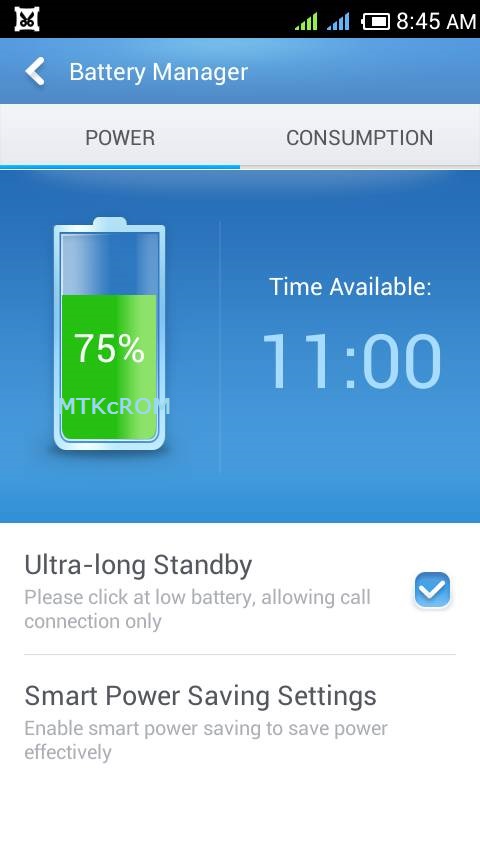
Smart Battery Saving
Root Permission Settings
Find Phone Option
Permission Monitor


Screenshot:


Download Baidu Rom for MT6572

If you port this rom for your device please send me the device name after ported.

Credit:

MTKcROM

Do not share this Rom without giving proper credit to MTKcROM.

Requirements:


Rooted Phone

CWM Recovery

Always Take full backup of current Rom before flash.


Install Process:
Reboot to Recovery Mode >

A.Wipe data/factory reset
B.Wipe cache partition
C. Mount and storage >
               1. Format data
               2. Format system
               3. Format cache
D. Advanced >
               1. Wipe dalvik cache

Back to the Main Menu.

Select
Install zip from sdcard > Choose zip from sdcard
Select Rom zip file.

Installation will start. Wait until finish.
It will Reboot automatically  
Enjoy Baidu Rom


This Baidu Custom Rom for Symphony W85 users and other MTK6572 users such as Lenovo A369i,
Xolo A500s, Huawei Y511, ZTE V818, Symphony W82, Symphony W72, Symphony W68,
Walton Primo E2, Walton Primo F4, Karbonn Mobile, Doogee, Micromax Mobile Need to port this rom.


MTK6572 Rom Porting

Fix Reverse Screen


N.B. : Do all things at your won Risk. I will not be responsible for any kind of Brick/Damage of your Device/Phone.