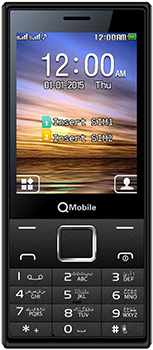
Inital Boot Ok!
BB_CPU_PID : 6572
BB_CPU_NME : [MediaTek] MT6572_S00
BB_CPU_EXT : 0xCA01 , 0x8A00 , 0x0000
Processing BROM stage
Settings for BROM configured!
SecCfgVal : 0x00000000
BromVer : 0x00FF
BLVersion : 0x0001
PreLoader : Active [ Boot with PL ]
BootLdrSS : NORMAL with SPRELOADER
Processing DA stage
DA Select done, will use MTK_AllInOne_DA_v5.1624.16.07
Sending and initialize DA ...
Running DA ver.4.2 on BBID : 0x88
NAND Flash : NOT INSTALLED
eMMC Flash : 7001004D4D43303447580E5B5C5F31B1
Initialize Memory ...
DRAM already initialized by Preloader
DAgent sent , init HW now
eMMC FlashIC initialized
[eMMC] : FLASH_VEN : 0x70 , OEM : 0100
[eMMC] : FLASH_INF : [KINGSTON] , G40CM
[eMMC] : FLASH_CID : 7001004D4D43303447580E5B5C5F31B1
[eMMC] : FLASH_BRT : 0x00200000 , 0x00200000 , 0x00020000
[eMMC] : FLASH_LEN : 0x00000000E6800000
[eMMC] : FLASH_UCP : 3688 MiB [eMMC 4 GiB]
DEV RID : 0x0D22E228555E80499F9F7C864587338F
INT RAM : 0x00020000
EXT RAM : 0x20000000 [512 MiB]
BOOT TYPE : EMMC_FLASH_BOOT
SOC VERIFY : C1
Boot Ok!
Reading Flash Content now ...
Brand : QMobile
ProdName : QMobile X35
ProdModel : QMobile X35
Device : QMobile
AndroidVer: 4.4.2
MTKxCPU : MT6572
MTKxPRJ : QMobileX35_MP_2014_0829
[Read Ok] : preloader_ztenj72_we_72_m536_kk.bin
[Read Ok] : MBR
[Read Ok] : EBR1
[Read Ok] : lk.bin
[Read Ok] : boot.img
[Read Ok] : recovery.img
[Read Ok] : secro.img
[Read Ok] : logo.bin
[Read Ok] : system.img
[Read Ok] : cache.img
[Read Ok] : userdata.img
[ScatCFG] : MT6572 / V1.1.1 / ztenj72_we_72_m536_kk / EMMC
Android Info saved
MAUI Meta DB saved
HWConfig Info saved
FW Size : 886 MiB
Scatter saved to : C:\Users\MarhabaGSM\X35\
Free firmware Without password
[post_ad]
How To Flash:
- Its a Scatter file you can flash it with SP Flash Tool or any Flasher Box
- Select “scatter-Loading” and Slect MT65XX_Android_scatter.txt in folder
- Wait file to be added into Flash Tool Or Any Flashing box
- Select “Download Only” or if upgrade “Firmware upgrade” in Flash Tool
- Turn off your phone
- Press “Download” Button to start
- And connect your phone with PC via USB data cable.
- The process will start and a red progress bar will appear after color purple, yellow.
- And green circles display
- Finish !
- You can now safely disconnect your phone and turn it on.
- its Done..!