Tecno Spark K7 Full Specifications and Price | for sock rom go to rompure.com

Barely a month after launching the WX series of smartphones into the Nigerian market, albeit silently, Tecno is back with two new devices which they claim is targeted at the youths and social media enthusiasts —Tecno Spark & Tecno Spark Plus.
Unlike how the WX devices were introduced into the market, Tecno is making A LOT of noise about these ones on social media, across prominent tech blogs and news outlets.
Here are the full details about both devices.

Tecno Spark

Quick Details

  • Network: 2G / 3G / 4G
  • Display: 5.5 inches, IPS LCD Touchscreen display — (720 x 1280 px)
  • Software: Android v7.0 (Nougat)
  • Processor: 1.3 GHz Octa-core CPU
  • Memory: 1GB/2GB RAM / 16GB ROM
  • Cameras: Front — 5 MP (with flash) / Rear — 13 MP (autofocus, LED flash)
  • Battery: 3000 mAh
  • Price: –
  • Other Features: Fingerprint sensor
The Tecno Spark (also known as Tecno K7) is a 5.5-inch display device in a metal unibody which, thanks to its Antenna band placement, looks a lot like the iPhone 7. At least, viewing the device from the back.
Looks aside, the device which ships with the latest Android version (Nougat) features a 1.3GHz Octa-core MediaTek CPU and about 2GB of RAM for multitasking.
For storing files and multimedia, the Tecno Spark has just 16GB of onboard storage which can be extended by a microSD card (up to 32GB).
The cameras on the device are also modest. With the front facing shooter having around 5 million pixels accompanied by its dedicated flash light for low light conditions, taking selfies should be effortless. The rear camera is a 13MP shooter also accompanied by a LED flash.

Tecno Spark Full Specifications

Here are the full essential details about the device…

Network and Software

2GYes
3GYes
4GYes
SIMDual SIM
Operating SystemAndroid v7.0 (Nougat)

Design and Display

Dimensions153 x 76.4 x 7.9 mm
Weight–
BuildMetal
ColorsChampagne Gold, Coral Blue, Metallic Red, Phantom Black
Display Size5.5 inches
Display TypeIPS LCD Touchscreen
Display Resolution720 x 1280 px

Performance and Hardware

Processor NameMediaTek
Processor Type1.3 GHz Octa-core CPU
GPUMali-T720
RAM1GB/2GB
Internal Memory16GB
SD Card SupportYes (up to 32GB)

Cameras

Front Camera5 MP (with flash)
Rear Camera13 MP (autofocus, LED flash)

Battery

Battery Capacity3000 mAh
TypeLi-Ion
Fast ChargingNo

Connectivity and Multimedia

BluetoothYes
WiFiYes (802.11 b/g/n)
GPSYes
USBmicroUSB v2.0
OTG–
Music PlayerYes
Video PlayerYes
FM RadioYes
LoudspeakerYes
Headphone JackYes

Other Features

Fingerprint ScannerYes

Tecno Spark Plus K9 Specifications and Price in Ghana Nigeria Kenya| for sock rom go to rompure.com

Tecno has unveiled two new Smartphone, Tecno Spark and Spark Plus. Tecno Spark Plus K9 comprises of a fine dazzling 6.0 inches, IPS LCD Touchscreen display, a powerful 1.5 GHz Octa-core CPU processor and the latest Android 7.0 Nougat. Spark Plus K9 also holds promise for photography and selfie admirers with its unique 5MP front with flash and a 13MP rear camera with flash.


The Tecno Spark Plus K9 comes with a 4G-LTE network, a large memory of 2GB + 16GB ROM,  a powerful 3400mAh large battery and a fingerprint sensor. The Spark Plus K9 running on Android 7.0 can give you a perfect working experience ensuring your applications are running smoothly under intense use.

READ
♻ Tecno Wx3 vs Tecno Wx4 Specifications and Price 
Tecno Spark Plus K9 Major Specs
Here are the Spark Plus K9 key specifications on what you should expect to enjoy when you purchase this smart device.
KEY SPECS
Display6.0 inches, IPS LCD Touchscreen display (720 x 1280 px)
OSAndroid 7.0 Nougat
Processor1.5 GHz Octa-core CPU
Storage16GB ROM + 2GB RAM
CameraFront – 5MP (with flash) / Rear – 13MP (autofocus, LED flash)
Battery3400mAh
PriceBetween ₦50,000 to ₦65,000

Tecno Spark Plus K9 Specifications and Price 

Below is the detailed specifications of Tecno Spark Plus K9

Network and Software

  • 2G: Yes
  • 3G: Yes
  • 4G: Yes
  • SIM: Dual SIM
  • Operating System: Android v7.0 (Nougat)

Design and Display

  • Dimensions: 162 x 82.6 x 7.75 mm
  • Weight: N/A
  • Build: Metal
  • Colors: Champagne Gold, Coral Blue, Metallic Red, Phantom Black
  • Display Size: 6.0 inches
  • Display Type: IPS LCD Touchscreen
  • Display Resolution: 720 x 1280 px

Performance and Hardware

  • Processor Name: MediaTek
  • Processor Type: 1.5 GHz Octa-core CPU
  • GPU: Mali-T720
  • RAM: 2GB
  • Internal Memory: 16GB
  • SD Card Support: Yes (up to 32GB)

Camera

  • Front Camera: 5MP (with flash)
  • Rear Camera: 13MP (autofocus, LED flash)

Battery

  • Battery Capacity: 3400 mAh
  • Type: Li-Ion
  • Fast Charging: No

Connectivity and Multimedia

  • Bluetooth: Yes
  • WiFi: Yes (802.11 b/g/n)
  • GPS: Yes
  • USB: microUSB v2.0
  • OTG: N/A
  • Music Player: Yes
  • Video Player: Yes
  • FM Radio: Yes
  • Loudspeaker: Yes
  • Headphone Jack: Yes
  • Fingerprint Scanner: Yes
What's your say about,  Tecno Spark Plus,  would love to hear from you via the comment 

Latest UK Proxy Server August 2017 Update| for sock rom go to rompure.com

These UK proxy severs will help you hide your current IP location and change it to UK. All you need to do is apply it to your browser.
                  uk-proxy-server
READ: What is Proxy Server and How to Use Proxy Server

 IP AddressPortCodeAnonymity
138.68.129.1218118GBtransparent
138.68.129.148118GBtransparent
138.68.129.1668118GBtransparent
138.68.129.1838118GBtransparent
138.68.129.1908118GBtransparent
138.68.129.218118GBelite proxy
138.68.129.2138118GBtransparent
138.68.129.2348118GBelite proxy
138.68.129.2388118GBelite proxy
138.68.129.278118GBelite proxy
138.68.129.678118GBtransparent
138.68.129.868118GBelite proxy
138.68.130.2528118GBtransparent
138.68.134.438118GBelite proxy
138.68.137.1538118GBtransparent
138.68.137.1548118GBtransparent
138.68.137.1698118GBelite proxy
138.68.137.2158118GBelite proxy
138.68.137.2298118GBelite proxy
138.68.137.2348118GBtransparent
128.199.163.2338080GBAnonymous
128.199.190.24380UKAnonymous
81.199.153.1468080GBtransparent
128.199.191.12380GBAnonymous
212.219.197.2498080GBtransparent
162.13.166.1493129GBtransparent
162.13.136.293129GBtransparent
162.13.152.2113129GBtransparent
128.199.138.788080GBAnonymous


81.128.165.53128DistortingGreat Britain (UK)08/10 15:55:57short
176.126.245.233128TransparentGreat Britain (UK)08/10 15:21:31short
163.172.164.1593128AnonymousGreat Britain (UK)08/10 15:17:03short
128.199.75.943128AnonymousGreat Britain (UK)08/10 15:14:35short
128.199.75.573128AnonymousGreat Britain (UK)08/10 15:14:19short
128.199.75.12380AnonymousGreat Britain (UK)08/10 15:14:15short
128.199.66.18680AnonymousGreat Britain (UK)08/10 15:14:08short
128.199.169.1780AnonymousGreat Britain (UK)08/10 03:35:34short
128.199.142.353128AnonymousGreat Britain (UK)08/9 01:43:07short
91.194.42.5180AnonymousGreat Britain (UK)08/9 00:24:50short
128.199.234.643128AnonymousGreat Britain (UK)08/8 23:43:43short
128.199.241.1738123Socks4Great Britain (UK)08/7 10:29:08short
178.239.168.577080Socks4Great Britain (UK)05/31 10:22:20short

Best Android Launchers of 2017 - Apps to Customize Your Android Phone| for sock rom go to rompure.com


Sometimes you might not like your Android phone default look and layout and might need to tweak it to look different and unique. This can be done only with aid of Android launchers. Android Launchers adds a whole new look to your Android layout but use the right one that suites your phone is very import because there are various types of Android launchers. Before we proceed any further, I would like to discuss what Android Launcher is. 


What is use of Launcher in Android?

Android is one of the most admired operating system for mobile phones and tablets, without any reasonable doubt about its quality and durability. Being an open source operating system, lot of app developers has been able to tweak and improve the android Os in terms of transforming the home screen, layouts and widgets, this bring the call to launchers, launchers are third party apps that brings a whole new look to our android device, once installed on our device, they'll make total changes total changes to our home screen and give it another beauty.
A launcher lets you customize the home-screen or app drawer of your Android smartphone and improve its performance. You can control the way your Android device works by defining your own gestures, changing the user interface and much more.
The Google Play Store is filled with hundreds of launchers for Android device, finding best Android launchers to customize your home screen can be a cumbersome job. To make your task easier, here is a list of best Android launchers of 2017.

Top Best Android Launchers To Download 2017

1. Nova Launcher

Nova Launcher developed by TeslaCoil Software is the highly customizable, performance driven and home screen replacement launcher for android. There's no doubt that there are tons of launchers out there but Nova launcher is probably the best among all of them. Yes! No need to accept any substitutes because Nova Launcher is the top launcher for modern Android which embraces a full Material Design throughout it's user interface.
Download Nova Launcher

2. GO Launcher


GO Launcher is a stylish & personalized application for Android phone, which provides more than 10000 beautiful mobile themes for you. We have professional designers who create abundant stylish launcher themes with a variety of styles every week, including stars, anime, game, cartoon and so on. Screen 3D effects, App Widgets & over 100000 free HD wallpapers are ready for you to customize your home screen, menu and lock screen. 
READ
Top Go Launcher Themes for Android

Cool launcher App of your mobile phone
With an independent developed 3D Engine, GO Launcher provides you with extremely fast and secure operating experience with simple, smooth and awesome 3D effects, dedicated to become the world's best partner of users who use Android mobiles in their life and work. 
Download GO Launcher

3. Evie Launcher

Evie Launcher

Evie Launcher is the latest and one of the fastest growing launchers having a beautiful user interface. The launcher allows you to save your home screen layout and restore it on another Android device easily. Swipe Up on your Home screen to find all of your apps
The Custom Shortcuts feature of the Evie Launcher allows you to create a home screen shortcut by pressing anything in search results for some time.
Evie Launcher has a rating of 4.6 in the Google Play and is available for a free download.

4. Apex Launcher

Apex Launcher
Apex Launcher is smooth and stylish and similar to the Nova Launcher in terms of its features. Hide apps which you don’t like on your home screen, customize home screen gestures, select different folder preview styles and background and more.
You can also backup your home screen and transfer the settings to another Android device. Apex Launcher has been developed by Android does and has been downloaded 50 million times from the Google Play Store.
Apex Launcher can be downloaded for free, the pro version of the app comes with features which include more gesture options, drawer customizations, unread count notifications.
Download Apex Launcher 


5. CM Launcher 3D

CM Launcher 3D
CM Launcher 3D by Cheetah Mobile is powered by a 3D engine with anti-virus engine to protect your privacy. The app has more than 10,000 free 3D themes, 2D icon packs and wallpapers to choose from. This is the best 3d launcher for Android.
CM Launcher 3D is smooth, fast and offers 3D animation effects.
The app has been downloaded 140 million times and has a rating of 4.6 in the Google Play.
Go ahead and download CM Launcher 3D for free from the Google Play Store.
Download CM Launcher 3D

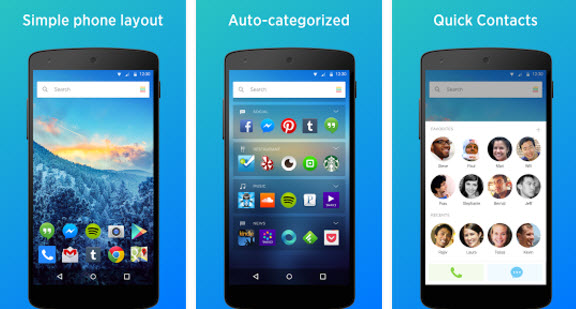
7. Yahoo Aviate Launcher

Yahoo Aviate Launcher
Yahoo Aviate Launcher provides a simple user interface and saves your time by automatically organizing apps and information on your Android.
Developed by Yahoo the app provides you information on weather reports, traffic conditions, near by places and news for the day.
Search about anything on the web using the launcher app and find a notification on bill pay reminders.
Yahoo Aviate Launcher is one of the best Android Launchers which can be downloaded for free and has a rating of 4.3.
8. Google Now Launcher 


Google Now Launcher bring Google to your home screen. Upgrade the launcher on your Android device for a fast, clean home screen that puts Google Now just a swipe away. You can easy activate Google Voice from the homescreen. 

Download Google Now Launcher


9. Buzz Launcher
Buzz Launcher

Buzz Launcher is the best Android Launcher which you can download on your Android smartphone offering various customization options. The launcher offers more than 1000,000 free themes to its users.
You can not only customize your home screen but also share your home screen with others on various social media platforms.
Buzz Launcher is completely ad-free and has a rating of 4.4 in the Google Play.
Download Buzz Launcher 

10. Launcher 8 WP Style

Want to try a new style like Windows Phone?
Launcher 8, is an excellent app for you to experience the Windows phone UI style on your Android devices. It will make your Android phone's homescreen looks like a Windows Phone.
With this fast, clean launcher, you can customize personalized Windows phone layout for your Android phone. Just surprise your friend with the new launcher on your android phone! Also, don’t forget to share your wonderful themes designed by yourself after learning how to use this launcher, may be your theme will be loved by all of us!

Download Launcher 8 WP Style

Conclusion 
These are the list of top free Android launchers you can use to customise your Android homescreen and layout. If have any other good launcher you are using above that was not listed above or currently using one, you can drop your review about it in the comment box and also don't forget to share with others.

DOWNLOAD GAME: Grand Theft Auto 5.apk + OBB Data / Raw File On Android | for sock rom go to rompure.com


gta v softwarerocket.blogspot.com

Ever wanted to download and play the latest GTA 5 on your Android phone?  If yes,  then you cannot download your favorite Grand Theft Auto V android for free.
Description :
Outside of missions, players may freely roam the open world. Composed of the San Andreas open countryside area and the fictional city of Los Santos, the world is much larger in area than earlier entries in the series. It may be fully explored after the game's beginning without restriction, although story progress unlocks more game play content.
Grand Theft Auto V is an action-adventure game played from either a first-person or third-person view. Players complete missions linear scenarios with set objectives to progress through the story.

Players use melee attacks, firearms and explosives to fight enemies, and may run, jump, swim or use vehicles to navigate the world. To accommodate the map's size, the game introduces vehicle types absent in its predecessor Grand Theft Auto IV, such as fixed-wing aircraft. Auto-aim and a cover system may be used as assistance against enemies in combat.
Should players take damage, their health meter will gradually regenerate to its halfway point. Players respawn at hospitals when their health depletes. If players commit crimes while playing, law enforcement agencies may respond as indicated by a "wanted" meter in the head-up display (HUD). Stars displayed on the meter indicate the current wanted level (for example, at the maximum five-star level, police helicopters and SWAT teams swarm to lethally dispatch players).

How to Play Gta 5 On Android 100% Works And Free

How to Install :
1.Download Gta 5 Apk
2.Also Download Gta 5 Both Data & Obb
3.Install Apk
4.Paste Obb Folder On Your Mobile Internal Android/Obb Folder
5.Play The Game
Enjoy............

Screenshot
gta v softwarerocket.blogspot.com

Game details :
Name - Gta 5 Apk+Data.zip
Size : 21.1mb + 600mb + 1.6gb

➖➖➖➖➖➖➖➖➖➖➖➖➖➖➖➖➖➖➖➖
SIMILAR GAMES 


➖➖➖➖➖➖➖➖➖➖➖➖➖➖➖➖➖➖➖➖

Download

Download Gta5.apk - 21.1mb
Download Gta5Data.zip - 600mb
Download Gta5Obb.zip 1.6Gb